The SFTP client that
stays out of your way
openSFTP is a free, open source SFTP client. Dual-pane layout, keyboard-driven workflow, embedded SSH terminal. Built with Rust. Single binary, ~8 MB, no runtime dependencies. No installation needed, just download and run.
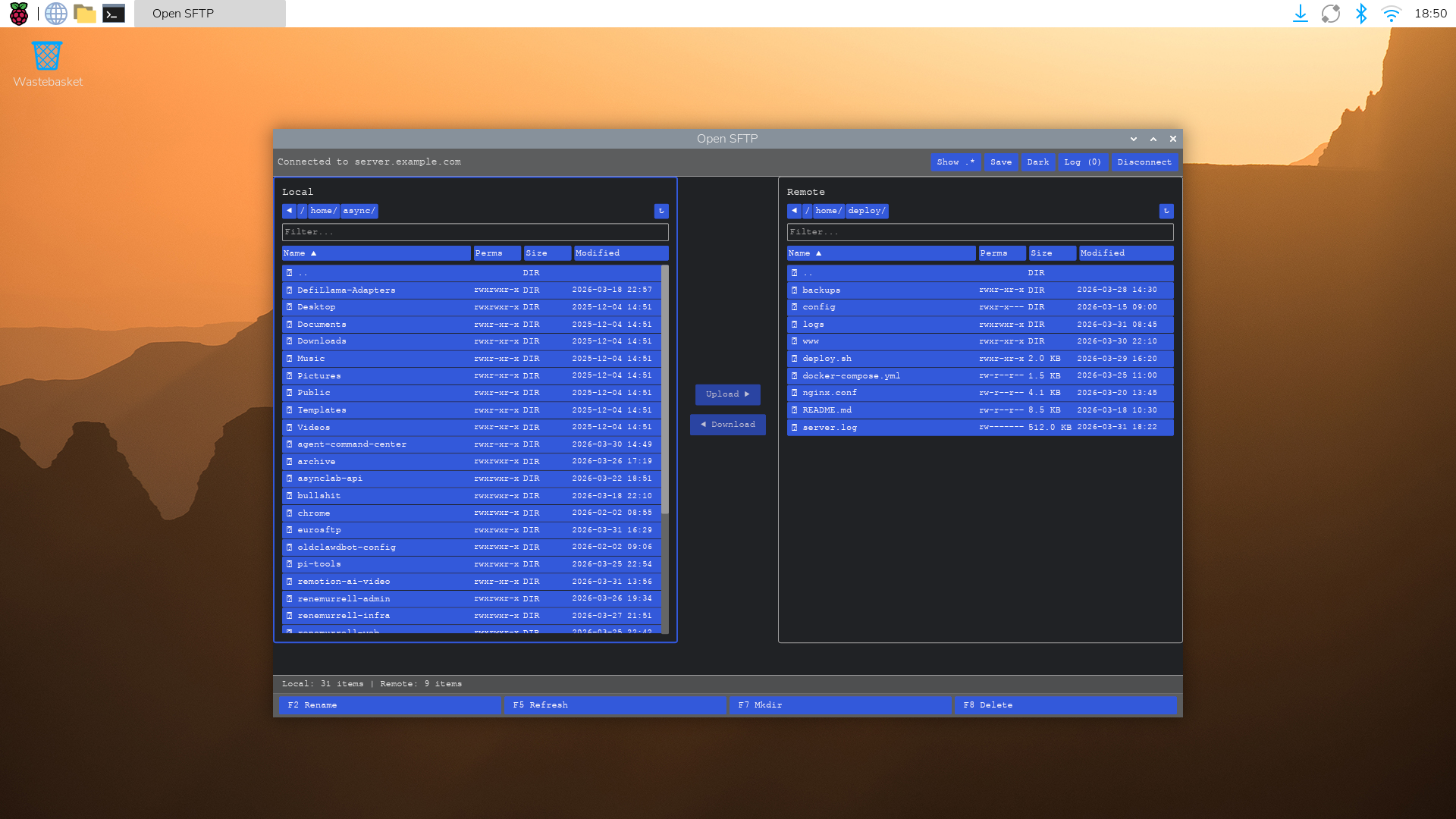
Dual-pane file browser with 22 themes. Built with Rust and Iced.
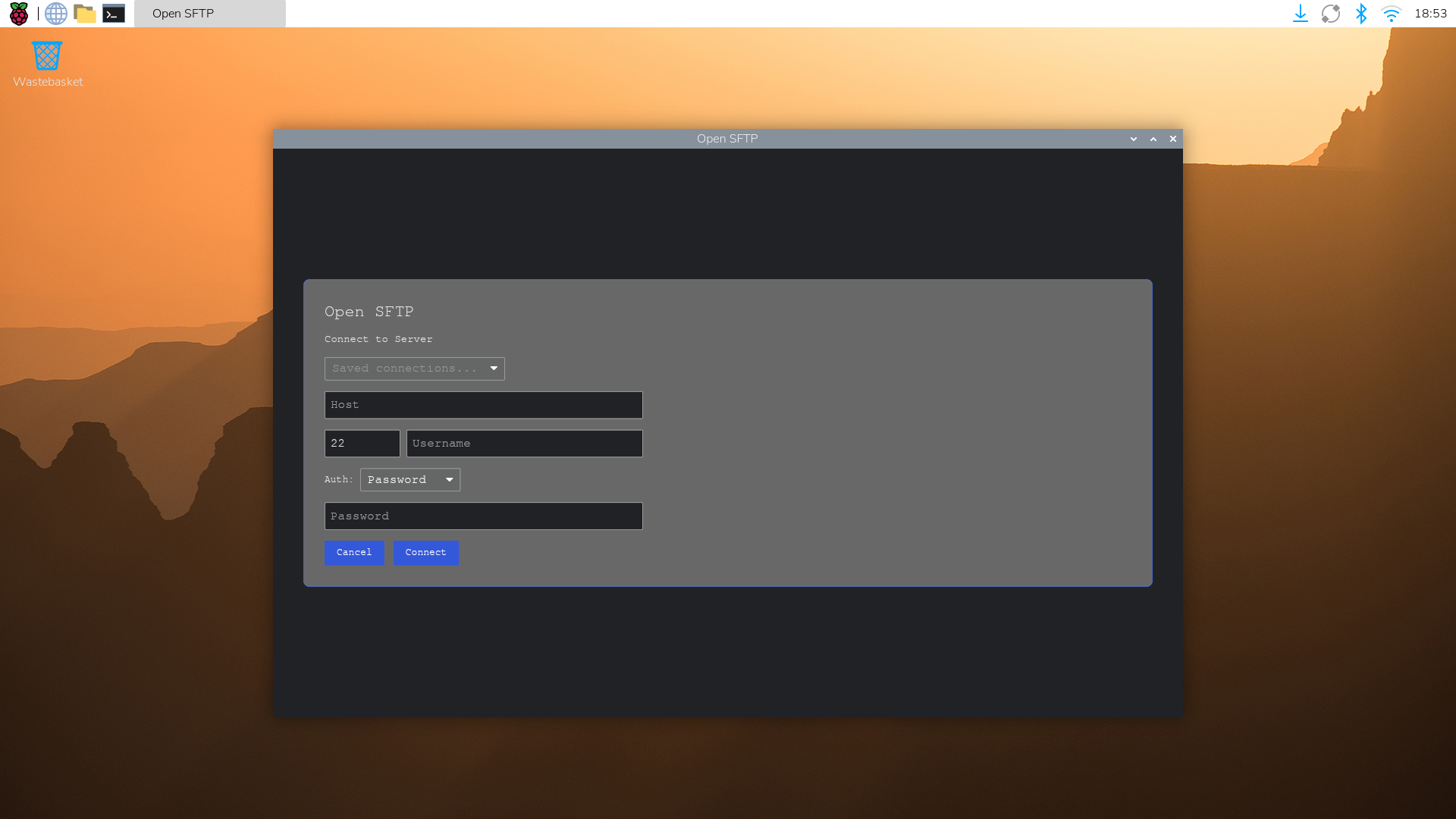
Connection dialog with password, SSH key, and agent authentication. Save profiles for quick connect.
Everything you need from an SFTP client
No bloat. No subscription. Just a fast, reliable file transfer client that works the way you expect.
Recursive transfers
Upload and download entire directory trees. Live progress with byte counters and a transfer log showing what succeeded and what failed.
Secure SSH connections
Full SSH key support (Ed25519, RSA, ECDSA), SSH agent integration, and jump host connections. Host keys verified against your known_hosts.
22 built-in themes
Catppuccin, Nord, Dracula, Solarized, Gruvbox, Tokyo Night, Kanagawa, and more. Switch live with Ctrl+T.
Dual-pane file browser
Local and remote directories side by side. Drag and drop, context menus, breadcrumbs, sorting, and a hidden file toggle.
Multi-tab sessions with restore
Open multiple server connections in tabs. All sessions, paths, and sort states are saved and restored on restart.
Embedded SSH terminal
Full terminal emulator built in. Run commands on the remote server without leaving the app. Toggle with Ctrl+`.
How openSFTP compares
Every SFTP client has a catch. openSFTP doesn't.
WinSCP is powerful but the UI feels like 2005. openSFTP is clean, keyboard-driven, and doesn't require a manual.
Full comparison →FileZilla works, but the toolbar-heavy interface and passive FTP dialogs are friction you don't need in 2025.
Full comparison →Cyberduck supports everything but feels heavy (Java). openSFTP is lightweight, dual-pane, and built for SFTP.
Full comparison →Transmit is excellent, $45, macOS only. openSFTP is free and open source and runs on Linux, macOS, and Windows.
Full comparison →MobaXterm packs in everything including the kitchen sink. openSFTP does one thing well: file transfer.
Full comparison →Termius needs a monthly plan just to unlock basic features. openSFTP is free, with no account and no recurring fee.
Full comparison →Download openSFTP
Version 0.1.0 · Free and open source · No account required · No installation needed
Version 0.1.0 · MIT licensed · all builds on GitHub Releases
Why another SFTP client?
Most SFTP clients fall into two camps: bloated GUI tools that take 10 seconds to connect, or command-line tools that require memorizing flags. openSFTP is neither. It gives you a clean, fast desktop interface without the overhead of Electron or Java.
Built in Rust, openSFTP is a single ~8 MB binary with no runtime dependencies. The dual-pane layout keeps local and remote files in view at all times. Sessions restore automatically. The keyboard shortcuts work the way you'd expect.
It is free and open source under the MIT license, and it stays that way — there is no paid tier, no account, and no telemetry. You can inspect the code, contribute, or fork it. It is also version 0.1.0 and early: the list of what it does not do yet is right below, and bug reports are welcome.
Free, all of it
There is no paid version
No subscription, no licence key, no feature held back. openSFTP is MIT-licensed and that is the whole product. Here is what it does today — and what it does not.
Included
Open source. No account, no telemetry.
- SFTP with full SSH key support (Ed25519, RSA, ECDSA) and SSH agent
- Dual-pane file browser with drag and drop
- 22 themes (Catppuccin, Nord, Dracula, Solarized, Gruvbox, Tokyo Night, and more)
- Jump host / bastion connections
- Session restore and multi-tab sessions
- Embedded SSH terminal
- Recursive directory upload and download
- Open source (MIT), no account, no telemetry
Not yet
Early software. These are missing today.
- FTP and FTPS (SFTP only)
- Parallel transfers and bandwidth limiting (transfers run one at a time)
- OS keychain integration (saved passwords are stored in plaintext)
- Cloud storage backends (S3, Google Cloud Storage)
- File search and filtering
- Automatic update checks
- Prebuilt Windows and Linux x86_64 binaries (build from source for now)
Questions? Open a GitHub issue
FAQ
Is openSFTP really free?
Yes. The free version is open source under the MIT license and has no feature expiry, no ads, and no account required. Download and run, no installation needed.
What protocols does openSFTP support?
SFTP (SSH File Transfer Protocol) only. FTP and FTPS are not supported.
Does it run on Apple Silicon?
Yes. The macOS build is a universal binary that runs natively on both Apple Silicon (M1/M2/M3) and Intel Macs.
Is there a paid version?
No. openSFTP is free and open source under the MIT license, and there are no plans to sell a paid tier. Nothing is held back behind a purchase.
How are saved passwords stored?
In plaintext, in an unencrypted JSON file in your config directory — there is no OS keychain integration yet. If you save a password, treat that file as a secret. SSH keys and the SSH agent are the safer options and store nothing through the app.
Do I need to install openSFTP?
No. openSFTP is a single portable binary with zero dependencies. Download, extract, and run. No installer, no admin rights, no runtime required.